


Related Posts



Podcasts



You’ve probably invested in HubSpot because you want clarity: better leads, smoother handovers, and proof that your marketing actually drives revenue.
What you don’t want is investing in HubSpot and then feeling like it’s just another system sitting half-set-up, with no one really using it.
That’s the trap most teams fall into: they buy HubSpot thinking it’ll “just work.”
But without the right onboarding, it turns into an expensive contact list instead of the full-stack solution it’s meant to be.
At RedPandas, we’ve spent over a decade helping Australian businesses fix that exact problem.
As a HubSpot Diamond Partner, we’ve built a 90-day onboarding program that gets HubSpot working the way it should: connected, automated, and actually delivering ROI.
Below, you’ll learn exactly what’s included in a RedPandas HubSpot onboarding package: what we set up, how we train your team, and how you’ll start seeing results in just a few months.
What HubSpot Onboarding Really Means
When most people hear onboarding, they think of tech setup: connecting domains, adding users, and ticking off settings.
That’s all a part of it, but they aren’t the parts that make HubSpot valuable.
Real onboarding is about building the bridge between how your business runs and how HubSpot supports it. It’s the strategy behind:
- Defining how your leads move through your pipeline
- What qualifies as a marketing-ready contact
- How your team can see ROI at a glance
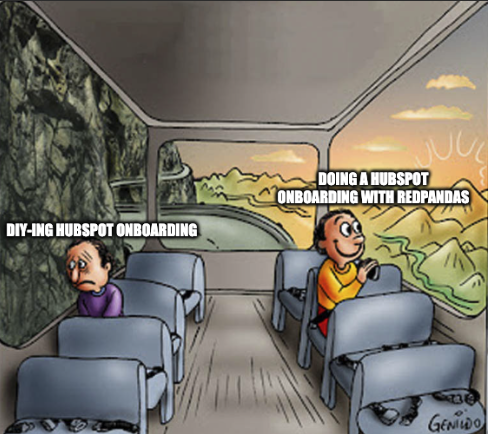
If you’ve tried to “DIY” HubSpot before, you’ve probably seen the symptoms of poor onboarding: duplicate data, confusing dashboards, and sales teams ignoring the system altogether.
But none of these things is a tech problem… they’re setup problems.
RedPandas’ onboarding fixes that by aligning HubSpot with your revenue process from day one. Every workflow, lifecycle stage, and dashboard is built around your goals, not a generic template.
It’s what turns HubSpot from a tool into an irreplaceable asset and source of direction for your marketing and sales.
What’s Included in RedPandas’ HubSpot Onboarding Package
Think of HubSpot onboarding like building a house. HubSpot gives you the materials (CRM, automation tools, reporting), but RedPandas helps you design the layout, sort out plumbing, wire the electricals, and move in without chaos.
This is what a timeline could look like when you onboard with us:
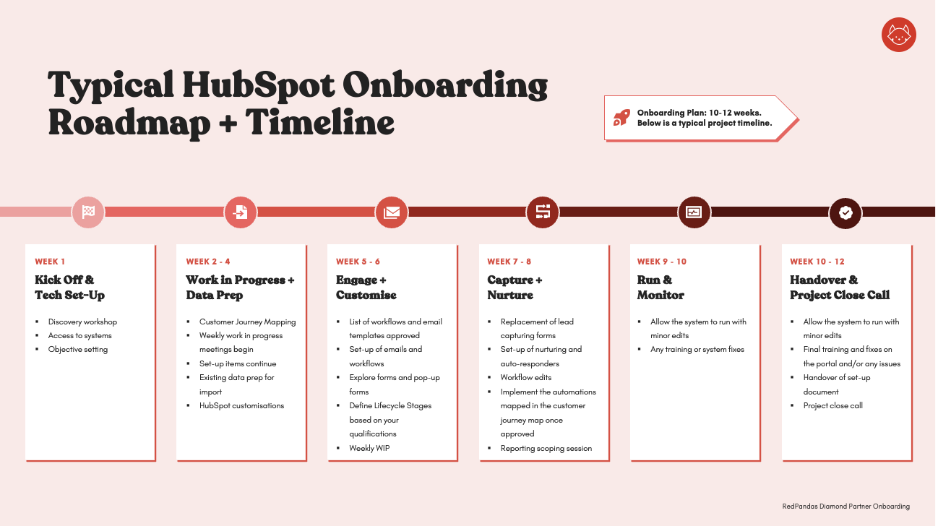
Within the above timeline, here are some of the key focus areas:
1. Tying Real Business Objectives with HubSpot Action Items
Your onboarding starts with a discovery workshop with your marketing and sales team.
During this discovery workshop, we will unpack your customer’s buyer journey. That is, what are all the steps they take from being a stranger to your business to prospect all the way to them becoming a raving fan of your business.
The discovery phase is the most vital step in your entire onboarding process. In this phase, not only do we unpack your buyer’s journey but also identify the business goals this tool is supposed to solve.
This will help us prioritise things like:
- Defining and increasing the number of sales-qualified leads
- Optimising your conversion and close rates
- Decrease customer churn
- And increasing automated contact with your existing clients
2. Building Your HubSpot Journey Map
After working on hundreds of portals over the last decade, we’ve discovered one crucial factor that impacts a company’s success with HubSpot: Building a great Customer Journey Map.


What is a Customer Journey Map
After the discovery phase, our main focus is building a Customer Journey Map (CJM), as this will dictate everything else we do within HubSpot.
Example of a CJM:
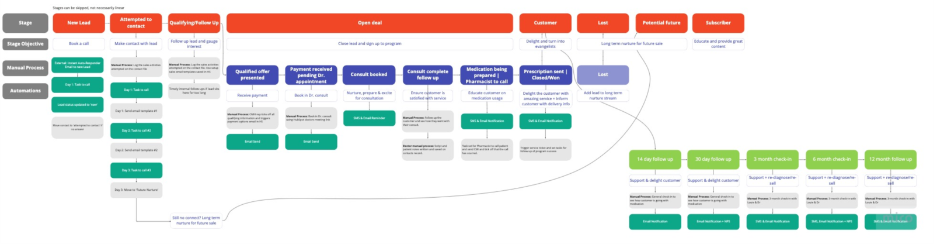
Once the discovery phase is complete, that’s when we move to the implementation phase, starting with CRM Setup and Data Migration.
3. CRM Setup and Data Migration
We start by cleaning and structuring your data so it works for you, not against you. That means migrating your contacts, companies, and deals into HubSpot with proper naming conventions and filters.
Example: Instead of 10 different “Job Title” fields floating around, we standardise everything so when you search for “Marketing Manager,” you get exactly who you need. Not just a spreadsheet full of half-matched names.
4. Pipeline and Lifecycle Setup
Next up, your sales process gets mapped inside HubSpot. We help you define what counts as a lead, MQL, SQL, and opportunity so everyone (marketing and sales alike) speaks the same language.
Example: If a demo request comes in, we’ll automate the next step: alert the right sales rep, assign a follow-up task, and track the deal stage in real time.
5. Marketing Automation and Lead Nurturing
This is where HubSpot starts earning its keep.
We build the workflows that automatically follow up with leads, score them based on engagement, and push the warmest prospects to your sales team.
Example: If someone downloads a pricing guide and visits your “Contact” page twice in a week, they’ll be flagged as a high-priority lead. Your team won’t have to guess who’s ready for outreach.
6. Dashboards and Reporting
In this stage, you can stop guessing if marketing is working. We create easy-to-read dashboards that show how campaigns are performing, where leads are coming from, and what revenue can be attributed to each source.
Example: Instead of saying “we got 40 leads this month,” you’ll be able to say “our Google Ads campaign generated $38k in pipeline and three closed deals.”
7. Training and Team Adoption
HubSpot is only as strong as the people using it. We run tailored training sessions for your marketing, sales, and management teams, showing them how to:
- Use dashboards
- Automate follow-ups
- Make data-driven decisions
Example: After onboarding, marketing can launch a campaign and track its ROI, while sales can pull up a deal’s full history in seconds. No one needs to chase information anymore.
8. Optional Integrations and Website Connections
In this final step of the onboarding process, we connect HubSpot to your existing tools (like websites, booking platforms, or ad accounts) so everything talks to each other.
Example: When a lead fills out a form on your site, their details can automatically sync to HubSpot, trigger a welcome email, and create a deal for your sales team.
Recap of What’s in the RedPandas HubSpot Onboarding Service
| Area | What’s Included | Why It Matters | Example in Practice |
| 1. Tying Real Business Objectives with HubSpot Action Items | Discovery workshop with your marketing and sales team that goes over your customer’s buyer journey. | Allows the RedPandas HubSpot team to better tailor HubSpot to your business goals. | You learn how your average customer interacts with your business, and how you can use HubSpot to guide them to a sale. |
| 2. Building Your HubSpot Journey Map | Outline the process of how cold leads, website visitors, or general web traffic turn into potential leads and your customers, based on touchpoints and your sales and marketing strategies. | Provides vital clarity on how HubSpot can best augment your marketing and sales strategies for better results and less resource wastage. | An outlined guide on how to set up HubSpot for you, based on which strategies may work best when a customer interacts with your business online. |
| 3. CRM Setup & Data Migration | Clean and import existing contact, company, and deal data into HubSpot. Standardise fields and properties for consistency. | Prevents messy data and duplications that frustrate users later. | You can search “Marketing Manager” and instantly find the right contacts, not a tangle of duplicates. |
| 4. Pipeline & Lifecycle Configuration | Build and customise deal pipelines, lifecycle stages, and lead statuses that match your sales process. | Creates alignment between marketing and sales; everyone tracks leads the same way. | A new demo request triggers an alert to the right rep and moves automatically to “MQL.” |
| 5. Marketing Automation & Lead Nurturing | Set up automated workflows, emails, and lead scoring based on engagement. | Saves hours of manual follow-up and ensures warm leads get prioritised. | A lead who downloads your pricing guide gets a personalised follow-up sequence. |
| 6. Reporting Dashboards & Attribution | Create dashboards for marketing, sales, and management showing performance and ROI. | Gives real visibility on what’s working and what’s wasting marketing and sales spend. | You’ll know which campaigns generate the most qualified leads and real revenue. |
| 7. Team Training & Adoption Coaching | Hands-on workshops for marketing, sales, and leadership teams. | Ensures your team actually uses HubSpot confidently after setup. | Sales learn to track deals in HubSpot instead of spreadsheets; marketing learns to launch campaigns with full tracking. |
| 8. Optional Integrations & Website Connections | Connect HubSpot to your website, ad accounts, CRMs, or booking tools. | Keeps your data flowing between platforms automatically. | A form submission on your website instantly creates a new contact and sends a follow-up email. |
| 9. Ongoing HubSpot Optimisation (Optional Add-On) | Continued optimisation, reporting tweaks, and strategy sessions. | Keeps HubSpot evolving as your business grows. | Monthly check-ins to review dashboards and refine automations. |
RedPandas’ onboarding is designed to remove friction, not just set up software. Every piece is built to help your teams work faster and make clearer decisions from day one.
To help you learn more about what to expect during the RedPandas HubSpot Onboarding Process, here’s a quick video guide:
How RedPandas’ Approach Differs from HubSpot’s Direct Onboarding
HubSpot’s own onboarding is like a set of instructions: it shows you how to use the tools, but not why they matter to your business.
RedPandas’ onboarding, on the other hand, is more like having an architect who designs the blueprint with you instead of just handing you the manual.
Here’s how that plays out:
1. Tailored Strategy, Not Generic Setup
HubSpot onboarding gives you checklists, and RedPandas HubSpot onboarding builds around your goals.
Before touching a single workflow, we dig into your marketing and sales process to understand what a qualified lead looks like, how deals move, and where reporting gaps exist.
Example: If you’re a home builder, your “lead” might be someone who downloaded a floor plan. For an education provider, it might be a student who’s booked a campus tour. RedPandas adapts HubSpot around your buyer’s journey instead of just working with a generic template.
2. Training Focused on Marketing and Sales Strategy, as Opposed to Only Focusing on the Tech
HubSpot’s sessions teach the features. RedPandas’ sessions train your people to use them in context. With our onboarding sessions, your team will learn how to:
- Follow up leads systematically and efficiently on HubSpot.
- Manage deals using HubSpot tools like lead lists.
- Report performance with the help of HubSpot’s report generation tools.
- Align marketing and sales to generate leads, nurture leads, and produce revenue.
On the other hand, with HubSpot Onboarding, the focus is on the tech and not on the strategy.
For example, a sales rep won’t just learn how to log calls; they’ll see how that data flows into dashboards that their manager reviews each week. Based on our experience, this process results in our clients and their teams achieving better accountability and cleaner data.
3. ROI Clarity Within 90 Days
Many businesses finish HubSpot onboarding and still can’t prove what it’s achieved. RedPandas’ onboarding process, on the other hand, sets measurable milestones (from lead tracking to revenue attribution).
So, by the end of 90 days, you can see exactly what’s working and what’s not.
For example, one client went from “We think our campaigns are working” to “Our latest campaigns helped us bring 378 per cent more leads.” That shift came from structured onboarding, not luck.
HubSpot’s onboarding helps you use the tool. RedPandas’ onboarding helps you profit from it. And to better understand the difference, here’s a video that outlines the differences to take note of in further detail:
The Impact of HubSpot Onboarding With RedPandas
You might be wondering, what results have we helped clients achieve with HubSpot?
Here’s a case study showing some of the results we’ve achieved:
- 10+ hours per week saved in reporting
- 3x faster customer response rates
- 100% visibility around productivity, deals and pipelines
- 2x increase in sales close rates

HubSpot Case Study
Should You Onboard With RedPandas or HubSpot Directly?
Ultimately, this depends on where you’re at in your journey.
If you’re not looking for marketing and sales strategy, and want to figure it out yourself, then going directly with HubSpot makes more sense.
This doesn’t mean HubSpot Onboarding isn’t valuable… it just means that their focus is more on the tool, while our focus is on the strategy first and then the tool second.
And in our experience, strategy first and tool second tends to generate more impressive results.
(Need to run the decision by your CEO or management? This guide can help you convince them to make the switch to HubSpot.)
If you’d like to find out more about our process, get in touch with a RedPandas HubSpot Expert here (P.S. We may be able to give you a HubSpot discount).